
Prosefly × Fumadocs
A visual CMS for your Fumadocs content.
Edit Fumadocs MDX visually, manage page properties and meta.json navigation, then publish reviewed changes to GitHub while keeping your existing app and build.
Read your existing Fumadocs document definitions and supported schemas. No separate CMS collection definition to maintain.
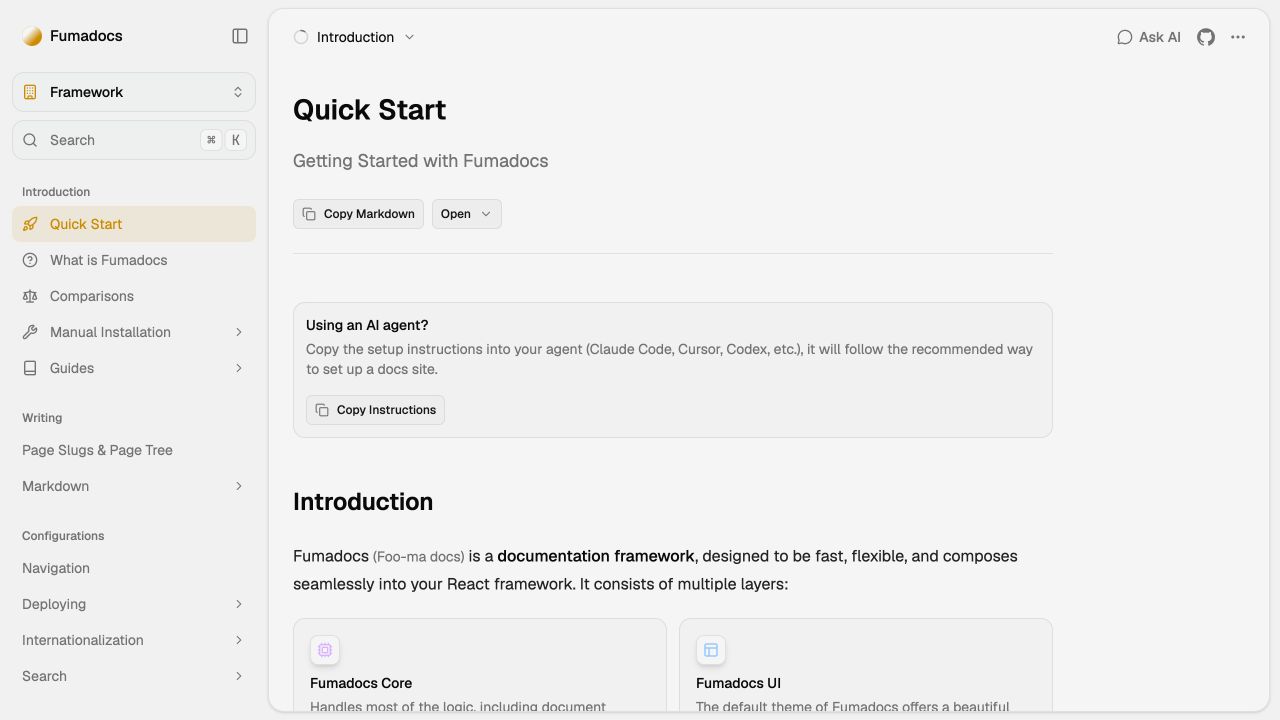
Start with a documentation template.
A documentation starter generated with Create Fumadocs. Write your pages in MDX while the application supplies navigation and the reading layout.
The screenshot shows the official documentation site. The starter gives you a foundation to customize for your own product.
Try the Fumadocs editor.
Edit the example, change its page properties, and review your changes. No account needed.

Loading editor…
Edit Markdown, MDX components, and frontmatter. Switch to Visual to apply your changes.
Review your changes
Compare your edits with the original example.
Original exampleYour changes
No changes yet. Edit the example to see the diff here.
Write MDX without working around its components.
Edit Markdown and supported Fumadocs callouts, tabs, steps, and accordions in the same visual editor. Keep page properties beside the document, and open Source for custom components and unsupported expressions.
This video shows the shared editor with a Prosefly MDX component. Try the embedded Fumadocs editor above for Fumadocs-specific component controls.
Reuse your Fumadocs source definitions
Read supported defineDocs and document Collection definitions in source.config or inline macro sources. Existing content directories and readable schemas determine the Collections and fields in Prosefly.
Keep native page lists
Confirm the matching navigation binding to place pages in supported meta.json lists. Navigation remains in the repository beside your docs.
Keep your application independent
The content workflow uses your repository files. Your Fumadocs host and existing website build remain responsible for rendering and deployment.
View example repository files
- source.config.ts
- content/docs/meta.json
- content/docs/index.mdx
Selected repository file
---
title: Project overview
description: Start here to get to know the project.
---

# Your first guide

A place for the things your team learns.Keep page order in your own meta.json files.
Confirm the navigation binding for your docs Collection, then place pages in supported meta.json lists. Review the MDX document and affected navigation files before publishing them through a commit or pull request.
Review and publish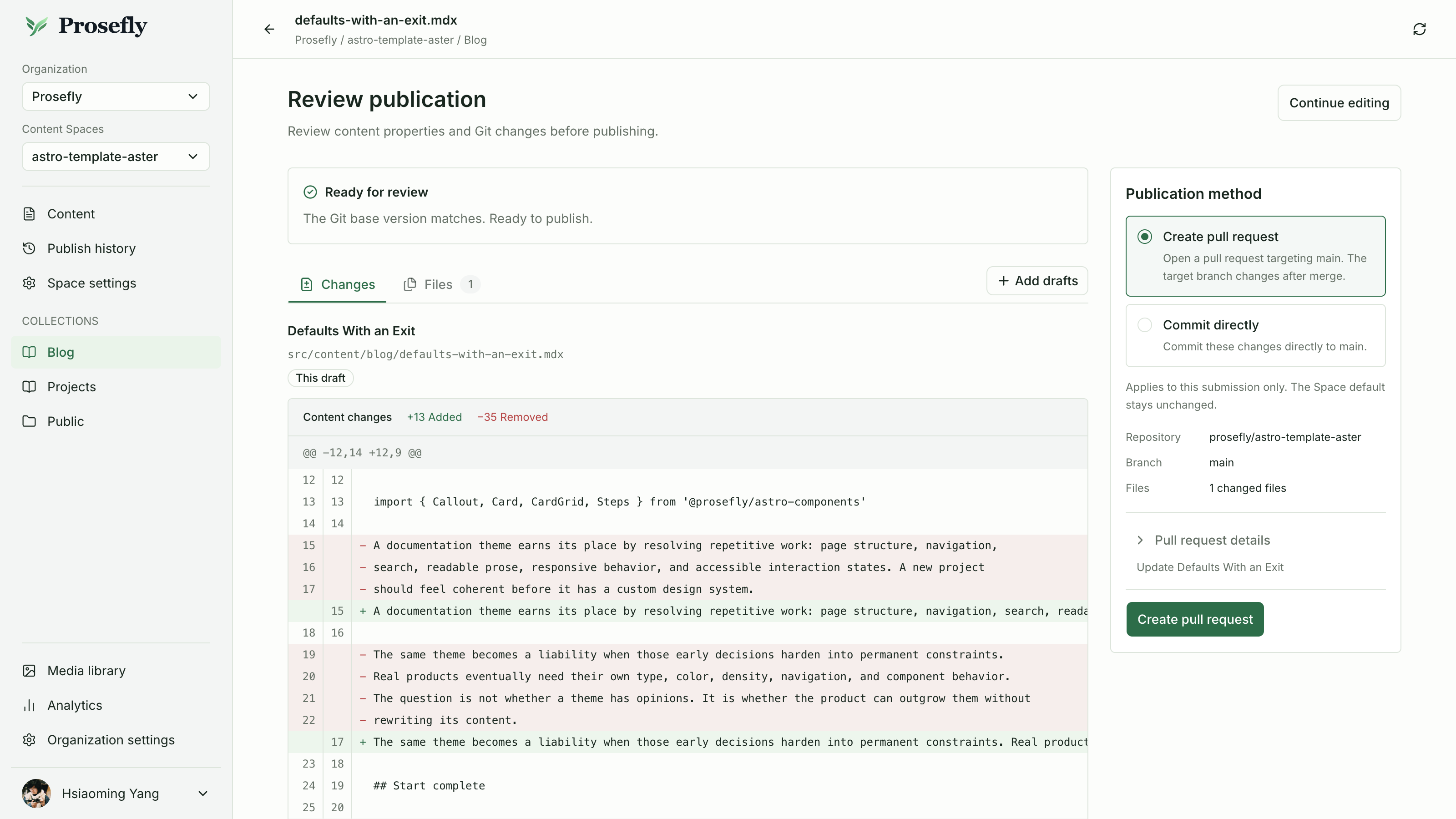
Connect your site. Keep its configuration.
- 01
Connect the Fumadocs application
Authorize GitHub and connect the repository containing your Fumadocs source configuration.
- 02
Confirm the detected Collections and page lists
Check the content directories, fields, editor profile, and supported meta.json binding found from your source definitions. Confirm the results without duplicating them in a CMS config.
- 03
Edit a page and publish the diff
Choose its supported placement, review the document and affected meta.json files, then publish through Git.
What to know before you connect
Localized meta files, custom loaders, source merges, and route transforms may require content-only publication.
Using a CMS with Fumadocs
Can I keep my existing Fumadocs application?
Yes. Prosefly works with the repository’s MDX files and supported source configuration. Your application, hosting, and build pipeline continue to render and deploy the site. You do not need to move the documentation to a different platform.
Can the team edit Fumadocs components visually?
Supported callouts, tabs, steps, and accordions can be edited in the visual editor. Custom components and unsupported expressions remain editable in Source. An administrator configures the Content Space, so writers do not need to learn Git commands.
How does meta.json navigation editing work?
With a matching navigation binding, arrange pages in supported native meta.json lists and review those files alongside the document. Localized meta files, custom loaders, merged sources, and route transforms may require publishing content without navigation changes.
Do I need to define the same Fumadocs content again for the CMS?
No, for supported static definitions. Prosefly reads your existing defineDocs or document Collection configuration and supported schemas, then detects the content directory and fields. You confirm the results instead of maintaining a second CMS definition. Custom layouts can use an optional .prosefly/config.yaml.
Published content stays in your Git repository.
Drafts stay in Prosefly until you publish. Review your changes, then create a commit or pull request. Your existing website build handles deployment.
Understand content ownershipKeep going
Connect a Content Space, understand publication, or explore the tools behind your website.
Explore another framework
Site framework
Astro
A Git-based Astro CMS for Markdown, MDX, and Content Collections.
Explore Astro
Site framework
Hugo
A Git-based Hugo CMS for Markdown, frontmatter, and page bundles.
Explore Hugo
Documentation tool
Starlight
A Starlight CMS for visual component editing, page properties, and native sidebar changes.
Explore Starlight
Astro documentation theme
Lotus
An Astro CMS for Lotus documentation, page properties, and docsNav.
Explore Lotus
Astro documentation theme
Dahlia
An Astro CMS for Dahlia documentation, page properties, and docsNav.
Explore Dahlia