
CMS integration
Connect Starlight Docs to a CMS
Connect Starlight to Prosefly, edit page properties and supported components, and review manual or automatic sidebar changes.
Give your team a visual CMS for an existing Starlight documentation site. An administrator connects the repository and configures publication. Writers can update guides, page properties, and supported components without learning Git commands.
You keep the Starlight site, its URLs, and its build pipeline. This guide takes one page from repository discovery to a reviewed content and navigation change.
1. Check the docs Collection
Your repository should contain the Starlight Astro application and its documentation files. The standard docs Collection uses Starlight’s loader and schema:

import { defineCollection } from 'astro:content';import { docsLoader } from '@astrojs/starlight/loaders';import { docsSchema } from '@astrojs/starlight/schema';
export const collections = {  docs: defineCollection({ loader: docsLoader(), schema: docsSchema() }),};
Keep the existing configuration if it already defines the Collection. Supported static schema extensions can add or override fields; Prosefly reads the definition without executing the application.
2. Connect, scan, and confirm navigation
From Organization settings → Repositories, connect the GitHub repository and choose Scan repository. Connect GitHub covers the account and GitHub App authorization steps.
Check the detected Starlight application, docs directory, Collection properties, editor profile, and native navigation configuration. Confirm the Content Space and its supported navigation binding, then wait for indexing to finish.
Try this step in the complete workflow.
3. Edit a guide and its page properties
Open a guide from Content. Use the visual editor for Markdown and supported Starlight components, including asides, tabs, cards, and file trees. In Properties, update fields such as Title and Description; additional supported fields are available under More properties.
Try this step in the complete workflow.
Open Source for custom components or expressions without visual controls. You can try the supported controls in the Starlight editor example; the example requires no account and resets on refresh.
4. Arrange manual entries and automatic groups
Open Navigation beside Properties and Outline. A supported static Starlight sidebar can combine manual entries and automatic directories, for example inside the existing starlight() configuration:

sidebar: [ { label: 'Start Here', items: ['overview'] }, { label: 'Guides', autogenerate: { directory: 'guides' } },];- Manual groups: arrange supported entries in existing writable groups, or place an unlisted page in a supported group.
- Automatic groups:
autogenerate.directorysupplies the pages. Drag existing pages to reorder them within the same directory; Prosefly updates theirsidebar.orderfrontmatter.
Try this step in the complete workflow.
Reordering generated pages does not move Markdown files. Wait for the navigation save status before opening review. The changes are still drafts and have not reached Git.
5. Review the affected files and publish
Open publication review and inspect every changed file. A manual sidebar edit can change astro.config.mjs; sorting automatic pages can change sidebar.order in their frontmatter. Review these alongside the document text.
Try this step in the complete workflow.
Publish using the Content Space’s configured Commit or Pull request mode. A PR must be merged into the target branch; the existing Starlight build then renders and deploys the site. Check the published page and sidebar after that build completes.
If the configuration cannot provide a writable native navigation binding, publish content only where appropriate. Content-only publication does not add a page to the sidebar. See website navigation and Publishing to Git for these decisions.
6. Your existing Starlight site stays in place.
After Git publication, the existing Astro build renders and deploys your site. A pull request first needs to be merged. The Website stage below shows the published Starlight example.
Try this step in the complete workflow.
Try the complete workflow
The example opens at editing. Use its stage controls to move through repository connection, discovery, editing, navigation, review, and the website preview.
Connect repositories
Choose a GitHub repository authorized for Prosefly.
No repositories available
Install the Prosefly GitHub App, then return to choose a repository.
3. Choose repositories
Select the repositories to connect to this organization.
No repositories match your search
Next: scan each repository and confirm its Content Spaces.
prosefly/starlight
Target branch: main
Only reads repository content. Git files are kept unchanged.
Confirm Content Spaces
Only reads repository content. Git files are kept unchanged.
docsAstroStarlight
docs/src/content/docsDefinitions from content schema · docs/src/content.config.ts
Navigation: docs/astro.config.mjs
Properties (15)
titleRequired- string
description- string
slug- string
template- enum
pagefind- boolean
draft- boolean
editUrl- string | boolean
head- array
tableOfContents- object | boolean
hero- object
banner- object
lastUpdated- date | boolean
prev- object | string | boolean
next- object | string | boolean
sidebar- object
Starlight
Browse content and drafts across this Space’s Collections.
| Content | Collections | Status | Last updated | Actions |
|---|---|---|---|---|
Introductionindex.mdx | Docs | Synced | now | |
Manual setupmanual-setup.mdx | Docs | Synced | now | |
Environmental impactenvironmental-impact.mdx | Docs | Synced | now | |
Getting startedgetting-started.mdx | Docs | Synced | now | |
Overviewoverview.mdx | Docs | Synced | now | |
Publishingpublishing.mdx | Docs | Synced | now | |
Configurationconfiguration.mdx | Docs | Synced | now | |
Publishing checklistpublishing-checklist.mdx | Docs | Has draft | now |
No matching content
Loading editor…
Edit Markdown, MDX components, and frontmatter. Switch to Visual to apply your changes.
Review your changes
Compare your edits with the original example.
Original exampleYour changes
No changes yet. Edit the example to see the diff here.
Prosefly / Starlight / Docs
Review publication
Review content properties and Git changes before publishing.
The Git base version matches. Ready to publish.
Edit the article or apply the example edit to see a diff.
All files below will be published together. Select a file to review its changes.
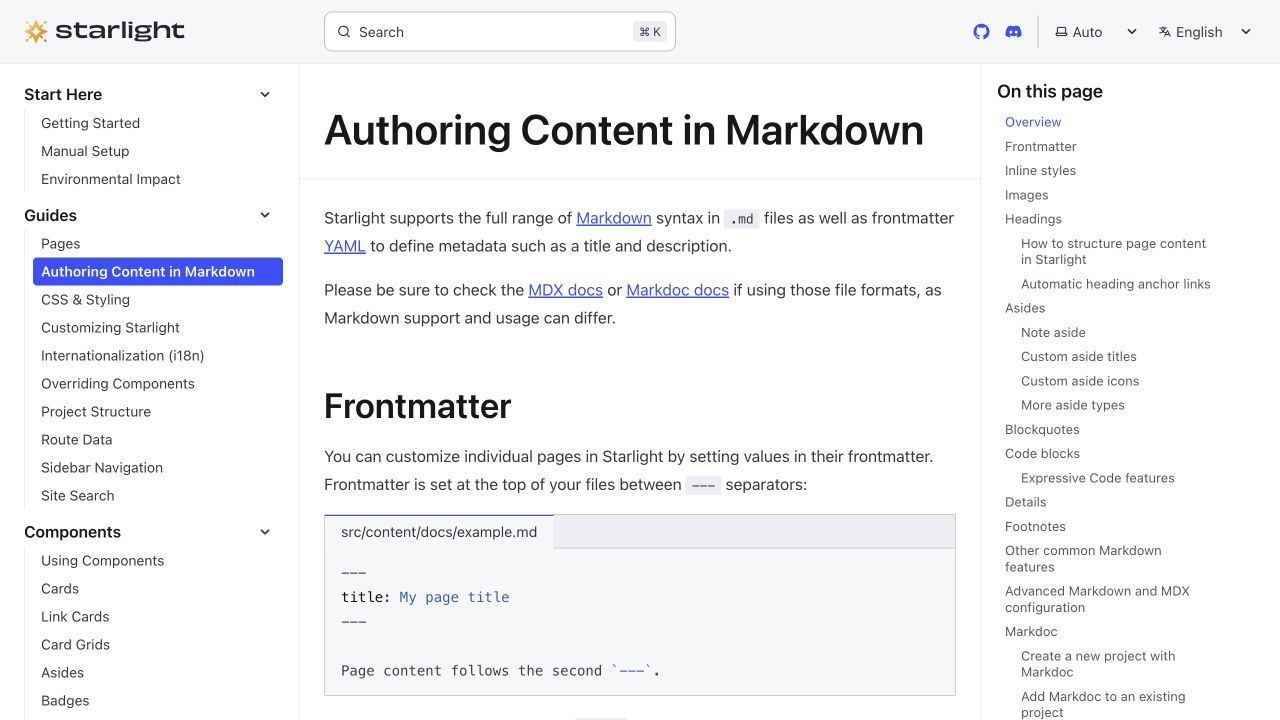
A published Starlight documentation page. After publication to Git, your existing Astro build updates your own site.
Check the MDX and frontmatter in the editor before continuing.
Starlight workflow: connect → scan → edit → navigation → review → website.
Check the first update
Confirm the page’s title and body, its intended sidebar placement, and the generated order. If configuration or files change outside Prosefly, scan again and refresh the index before continuing.
Continue with the Starlight CMS overview, product documentation workflow, MDX component guides, or Starlight authoring documentation.
Last updated Oct 19, 2026